With a comment tool beside it
A comment library such as Annotate Pro supplying each comment
about 30 seca student
- Roughly a third of the rubric time
- About half an hour to 1½ hours back on one assignment
A Chrome extension for professors who grade with rubrics in Canvas SpeedGrader. Grade one student the way you always do, then click Set this as Default. From there, one click puts your comment on every criterion, a score on every line, and the student's first name at the top of the assignment comments. You change what that student needs, then submit it yourself.
Free for your first 14 days. The trial doesn't need a card. After that it's $24 a year, and nothing is charged unless you buy a license. Add it from the Chrome Web Store.
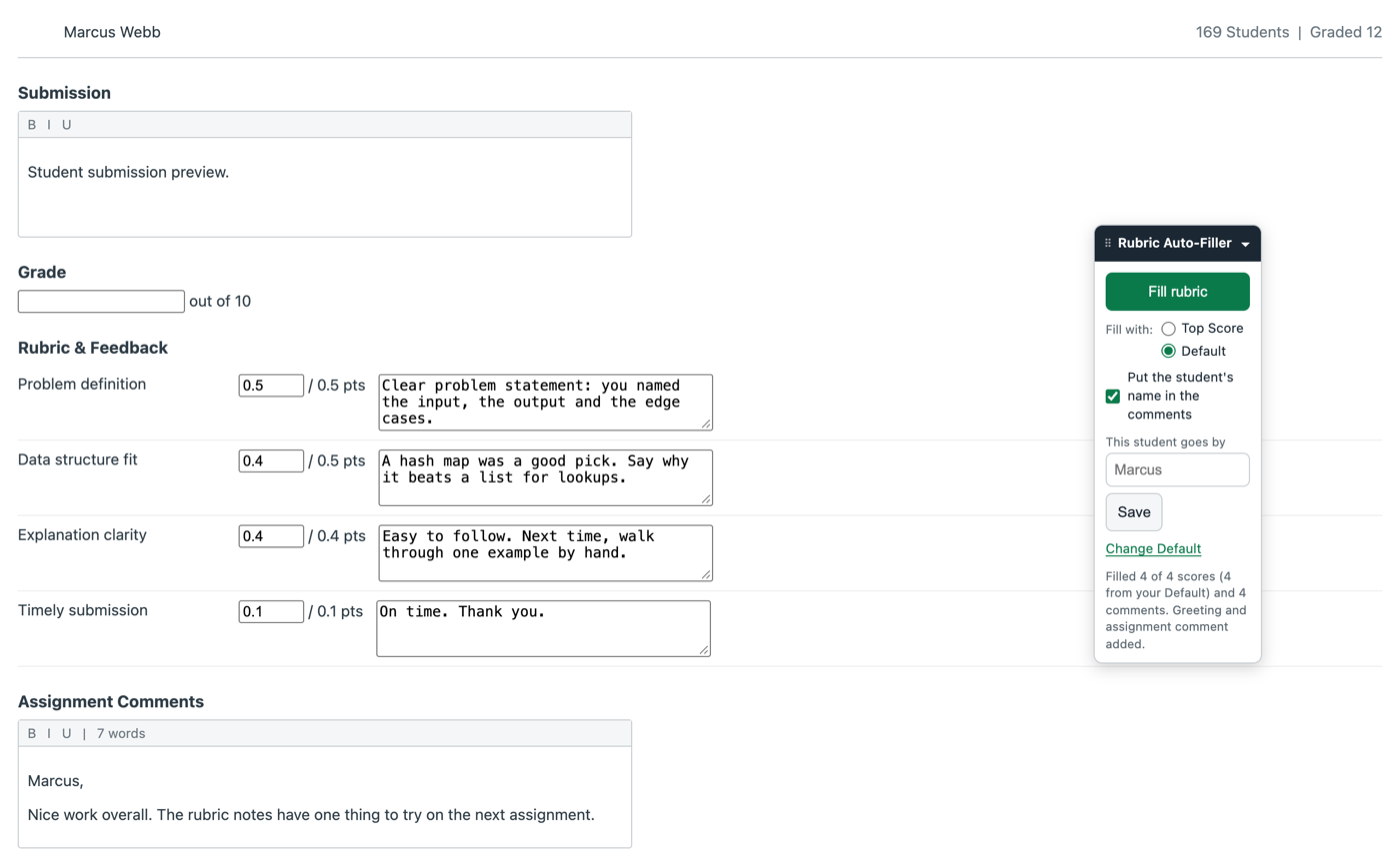
One student, one click of Fill. Shown on a test page that copies the SpeedGrader layout, with a made-up student.
The whole tool is 2 buttons on a small panel in the corner of SpeedGrader. Nothing is written to the page until you click the second one.
Scores, your comment on each criterion, your standard comment in the Assignment Comments box. Then click Set this as Default (if you don't see it, click Change Default first). Each assignment keeps its own Default, so you set one for each new assignment.
With Fill with: Default (where it starts), every criterion gets the score and comment you saved, and your standard comment goes in the Assignment Comments box. With Fill with: Top Score, every criterion gets its top score and the comment boxes are left alone. Either way, the student's first name goes at the top of the assignment comments. Switch the name off if you'd rather not.
Edit any line, same as you would have anyway. Then submit the way you always have. The tool never submits an assessment and never posts a grade.
The panel only shows when SpeedGrader is open. It knows which assignment is on screen and brings back the Default you saved for it, so you can switch between assignments freely.
Works in both kinds of Canvas rubric, Scale and Written Feedback, in the Traditional, Horizontal and Vertical views. On an assignment with no rubric, it saves and fills the grade and your assignment comment instead. Press Enter in the grade box to save the grade, the same as one you typed.
The next student, before
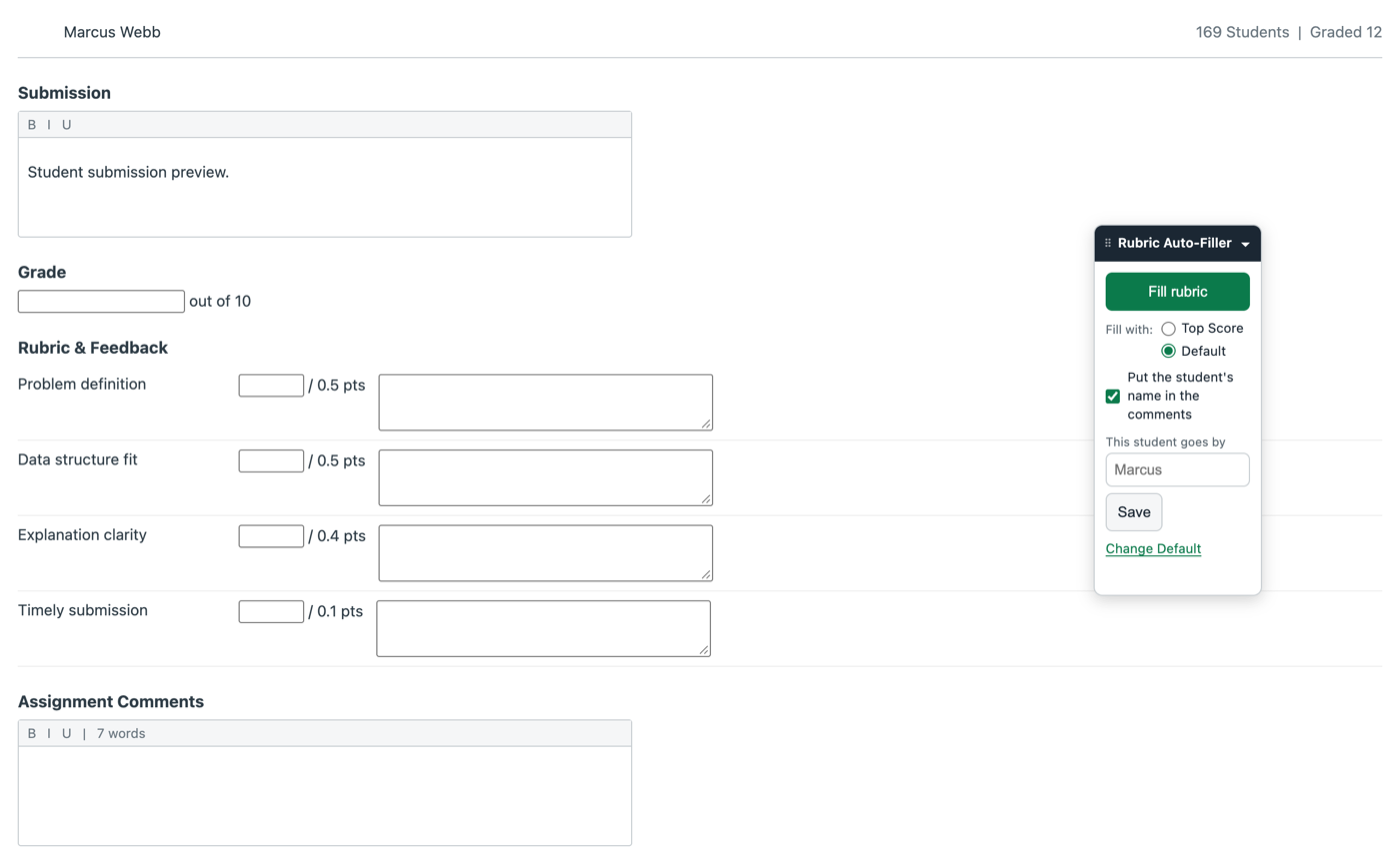
After 1 click
A test page that copies the SpeedGrader layout, so no real student work is on this site. The panel reads the same on your own Canvas.
Two timings, both from one professor's own assignments of 120 to 170 students. Which one is yours depends on where your comments come from today. They're estimates, and your own numbers will probably come out different.
A comment library such as Annotate Pro supplying each comment
Each comment pasted in by hand from a file you keep
Timed by one professor on their own classes, on the Enhanced Rubrics feature in Canvas. The time it gives back is the rubric part, not the reading. Multiply that by however many rubric-graded assignments you set in a year.
Submitting is the one click that's yours. The tool doesn't have a button for it.
You can move between students all day, and the boxes stay exactly as Canvas left them.
On your Canvas site, on the computer you're using. A different computer starts empty.
No account, no sign-in, no tracking and no usage reports. We never see your students, your comments or your scores. The privacy policy, in plain English.
Free for your first 14 days. Install it and grade with it for 14 days, counting the first day you use it in SpeedGrader. After that, Fill asks for a license key (Set this as Default and everything else on the panel keep working). You don't need a card for the trial, so nothing is charged unless you buy a license.
$24 a year, paid once a year. You buy on a checkout page run by Link, part of Stripe. (Link is the company that sells the license, so the charge should read LINK.COM* APPS BY PEAK on your statement.)
The page you land on after paying shows your license key, and we email it to you too. Paste it into the box at the bottom of the panel once, and your browser remembers it. It renews once a year until you cancel, which you can do any time at appsbypeak.com/rubric-auto-filler/manage/.
Beta copies stay free through December 31, 2026. A copy first used before December 7, 2026 is a beta copy, so it doesn't need a license until the end of this semester. From January 1, 2027, Fill asks for a key on that copy. (The box for a key shows on the panel from December 7 on, so a key bought before then waits until that day.)
Google Chrome, and a Canvas site at an address ending in instructure.com, with the Enhanced Rubrics feature turned on. If your school hasn't switched to Enhanced Rubrics yet, the panel can't see the rubric, so it works as it does on an assignment with no rubric.
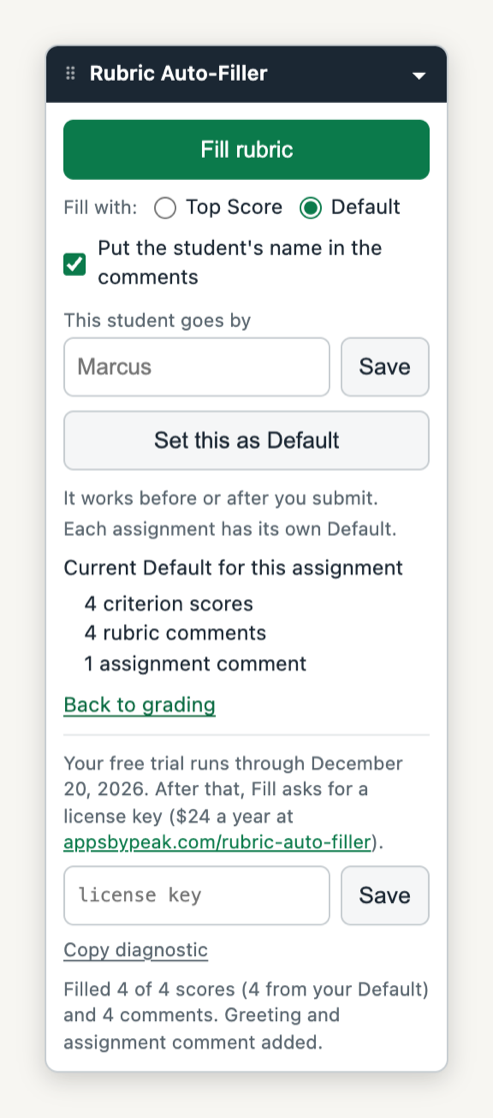
Sits at the bottom left of SpeedGrader. While you grade it stays small (Fill rubric and a few switches), and Change Default opens the rest, shown here. Drag it anywhere, or fold it to a title bar when you don't need it. No toolbar button and no settings page.
When you buy a license, the page you land on after paying shows your license key, and we email it to you too. Open any SpeedGrader page, paste the key into the box at the bottom of the panel (click Change Default if you don't see the box), and press Save. Your browser remembers it from then on. The key gets checked with us, once when you paste it and about once a day after that. Nothing about your grading goes with it.
Lost the key? appsbypeak.com/rubric-auto-filler/thanks/ sends it again. Manage or cancel any time at appsbypeak.com/rubric-auto-filler/manage/.
Canvas changes often, and now and then a change moves something the tool relies on. First, reload SpeedGrader, because a tab that was open when Chrome updated the extension keeps running the old copy. If Fill still stops, click Copy diagnostic (it's under Change Default) and email the result to hello@aibypeak.com. It's a plain report of the page's shape, with no student names or comment text, and it's usually all we need.
Here's a line you can send them, as is:
If you grade with rubrics in SpeedGrader, take a look at the Chrome extension Rubric Auto-Filler (appsbypeak.com/rubric-auto-filler), which fills every criterion with your own standard comment and the points in 1 click, and it's $24 a year after a 14-day free trial.
Spell it either way. If a colleague said “rubric autofiller” and you searched for Canvas rubric autofill or SpeedGrader rubric comments, this is the one.
Apps By Peak is an independent software company. Rubric Auto-Filler grew out of one professor's grading load, and it stays small on purpose (one job, one click). Write to hello@aibypeak.com with any question about it. A person reads what you write.